

SurveyMonkey has established itself as the go-to platform for fast, data-driven decision-making, offering a cloud-based solution that democratizes advanced survey creation and analysis for SMBs, enterprises, agencies, and consultants. As the SaaS industry rapidly evolves towards 2026, SurveyMonkey aims to integrate predictive analytics, AI-driven insights, and slicker team collaboration, unifying feedback collection for organizations striving for market agility.
From Launch to 2026: A Timeline
- 2000: SurveyMonkey launches, pioneering the self-serve online survey model.
- 2013–2019: Expands into enterprise; launches mobile app, upgrades analytics, and focuses on scale.
- 2021: Adds advanced integrations, custom workflows, and team management.
- 2024: Leading platform for survey intelligence, competitive with Qualtrics, Typeform, and Google Forms.
- 2026 (vision): End-to-end insight engine with predictive analytics, AI recommendations, omni-channel feedback, and seamless visual reporting for distributed teams.
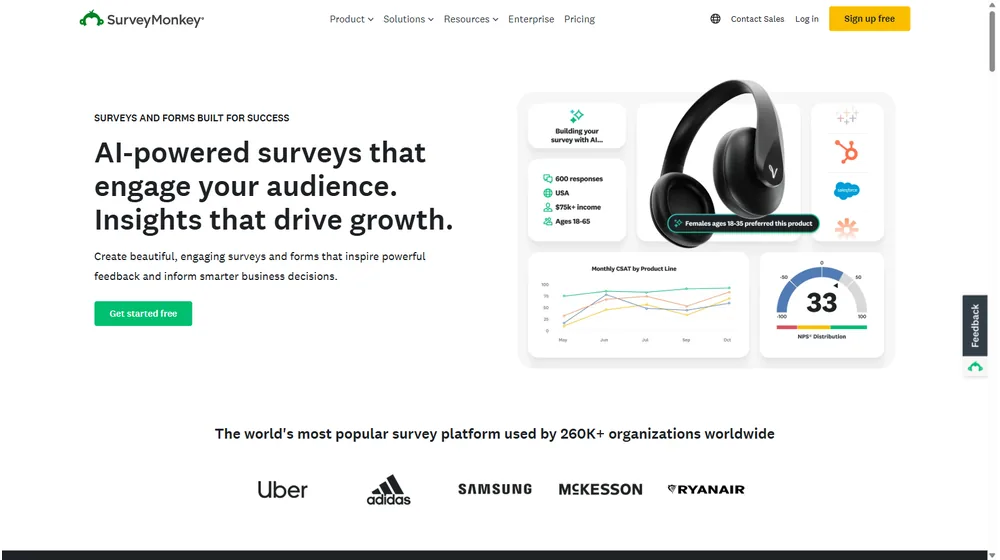
Key Features by Capability
- Survey Builder: Intuitive drag-and-drop UI, question libraries, templates for NPS, CSAT, employee, and market research surveys.
- Real-Time Analytics: Dashboards, cross-tab segmentation, filterable charts, and export to Excel, SPSS, or Google Sheets.
- AI-Powered Insights: Automated trend detection, sentiment analysis, and predictive response suggestions (expanding through 2026).
- Distribution & Collection: Multichannel send (email, SMS, web links, social); QR code generation; survey panel integration for targeting respondents.
- Collaboration: Role-based access, shared workspaces, in-survey comments & review, approval workflows.
- Branding & White Label: Custom logo, color, font, and domain controls for a unified brand experience.
- Integrations: Native connections to Salesforce, Slack, HubSpot, Mailchimp, Zapier, Microsoft Teams, and more.
- Compliance & Security: GDPR-compliant, SOC2 certified, SSO/SAML, and available HIPAA support for healthcare and regulated teams.


Workflow & UX
- Guided survey creation—pre-built logic, skip patterns, scoring, and randomization for robust data.
- Flexible result sharing—link, export, or real-time presentation mode for stakeholders.
- Multi-user dashboard with granular permissions and team visibility for project transparency.
- Clean, mobile-friendly interface designed for non-technical users while supporting advanced controls for power users.
SurveyMonkey Pricing
| Plan | Main Features | Pricing |
|---|---|---|
| Basic (Individual) | Unlimited surveys, 10 questions/survey, 100 responses/month | Free |
| Standard (Individual) | Unlimited questions, logic, data exports, email support | $39/mo per user |
| Advantage (Individual) | Survey templates, advanced analysis, file upload, A/B testing | $32/mo per user (annual) |
| Team Advantage | Team analytics, shared library, collaboration tools | $25/mo per user (annual), 3+ users |
| Team Premier | All advantage features, white-label, SSO, priority support | $75/mo per user (annual), 3+ users |
| Enterprise | Custom domains, full compliance suite, advanced integrations | Custom quote |
SurveyMonkey vs Competitors
| Feature | SurveyMonkey | Typeform | Qualtrics | Google Forms |
|---|---|---|---|---|
| Ease of Use | Very intuitive | Modern, visual | Complex, enterprise | Simple, basic |
| Analytics | Advanced, AI-assist | Basic | Enterprise analytics | Limited |
| Branding/White Label | Full | Partial | Full | Minimal |
| Integrations | Robust | Moderate | Strong | Google only |
| Pricing | Mid-range | Similar | Premium | Free |
| Target User | SMB, mid/enterprise | SMB, creative shops | Enterprise | Individual/edu |
| AI Features | Growing | Limited | Advanced | None |
Pro Tip: Use SurveyMonkey to automate repetitive feedback cycles—especially for quarterly NPS—and set up real-time alerts to act on survey results faster than your competition.

Integrations
- CRM: Salesforce, HubSpot, Zoho, Pipedrive
- Communication: Slack, Microsoft Teams, Gmail
- Marketing: Mailchimp, Marketo, Constant Contact
- Automation: Zapier, Workato, Integromat
- BI/Data: Google Sheets, Tableau, PowerBI, SPSS
- Webhooks and API: Extensible for custom workflows and in-house platforms
Pros & Cons
| Pros | Cons |
|---|---|
|
|
Final Thoughts
For organizations seeking to unlock customer, employee, or market insights at scale, SurveyMonkey delivers a market-proven, rapidly evolving SaaS platform. Its blend of ease-of-use, enterprise-grade features, and deep integration options make it an essential consideration for any SMB or team poised for data-driven growth. With continual AI enhancements and a clear evolution towards automated business intelligence by 2026, it cements its position at the top of the survey and feedback category.
SurveyMonkey FAQ
Yes, it meets GDPR standards and supports HIPAA via a signed BAA on eligible plans.
Yes, white-label portals support your domain, favicon, and brand visuals.
Ideal for consultants, service firms, and SMBs needing streamlined collaboration.
No—integrates with both. Stripe powers payments; QuickBooks handles accounting.
All plans include chat/email; premium tiers add onboarding and 1:1 setup help.




