

Sunsama is rapidly establishing itself as a keystone in the productivity SaaS landscape, evolving by 2026 into more than just a digital daily planner. With its unified task, calendar, and workflow hub, Sunsama is tailored for SMB owners, lean teams, consultants, and entrepreneurs aiming to orchestrate tasks, meetings, and priorities without context-switching or data overload.
From Launch to 2026: Product Timeline & Positioning
- 2020-2022: Focused launch on daily planning for solo professionals and execs. Early adoption via integrations with Google Calendar, Outlook, Todoist, Asana.
- 2023: Added timeboxing, team collaboration, and deeper calendar/task integration. Usage expanded to small and midsize teams demanding workflow discipline and visibility.
- 2024: Introduced automated planning, AI-based agenda suggestions, and enhanced reporting. Supported multi-user environments and became a top alternative to tools like Motion and Akiflow.
- 2025 (projected): Expanded third-party integrations, robust mobile parity, and advanced customization—positioning Sunsama as a workflow control center for hybrid teams.
- 2026 (projected): Sunsama cements its niche as an intelligent, cross-platform priority manager—bridging meetings, tasks, and documentation for SMBs and consultants needing transparency and focus.
Key Features
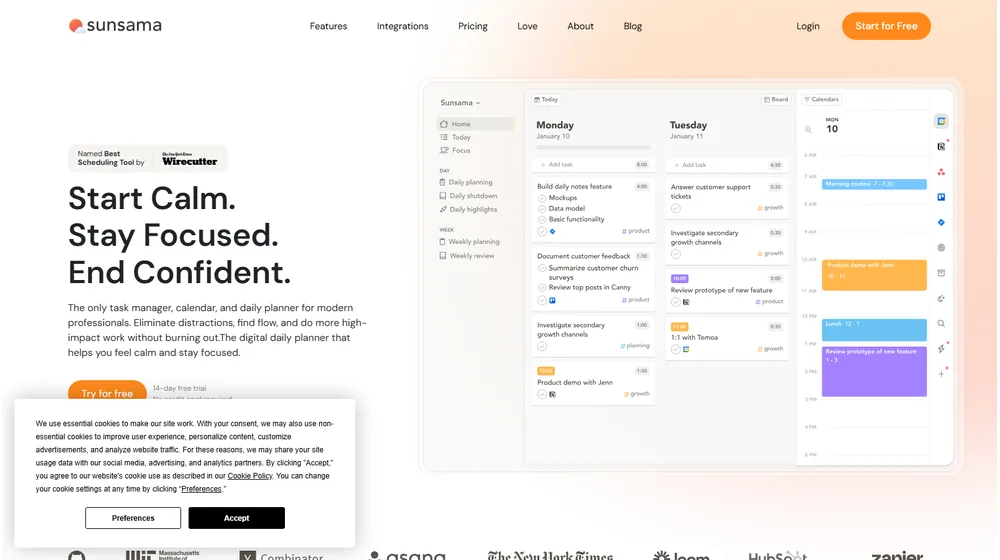
- Unified daily and weekly planning: Combine tasks from multiple sources with calendar events in a single, drag-and-drop interface.
- Timeboxing & Focus Mode: Allocate slots for deep work, task pacing, and effective meeting preparation.
- Multi-app integration: Syncs across Google/Outlook Calendar, Trello, Asana, ClickUp, Todoist, Slack, and more.
- Collaboration tools: Assign tasks, share progress, enable transparent team workload balance and async check-ins.
- AI-powered suggestions: Smart planning, daily agenda recommendations, and activity analysis without extra configuration.
- Analytics & reporting: Visualize focus trends, project progress, time spent, and team capacity metrics.
- Mobile and desktop apps: Seamless cross-device planning (iOS, Android, Windows, MacOS, Web).


Workflow & UX
- Clean, distraction-free interface that prioritizes clarity and quick capture of new tasks.
- Flexible: Supports GTD, kanban, Eisenhower Matrix, and custom daily/weekly review methodologies.
- No-code automations: Drag-to-schedule, recurring tasks, and calendar linking—without scripting.
- Personal and shared views: Keep sensitive work private or open up collaborative space for teams.
- Real-time sync: Updates propagate instantly across users and devices.
Sunsama Pricing
| Plan | Key Features | Pricing |
|---|---|---|
| Monthly | Full features, all integrations, team collaboration, priority support | $20/user/mo |
| Annual | All Monthly features; billed yearly for savings | $16/user/mo (billed annually) |
| Free Trial | 14 days, no credit card; full access | $0 |
Comparing Sunsama to Alternatives
| Feature | Sunsama | Motion | ClickUp | Akiflow |
|---|---|---|---|---|
| Task + Calendar Integration | Full bi-directional | Automated | Partial | Full |
| AI Scheduling | Agenda suggestions | Autoplanning | Limited | Manual |
| Mobile Apps | Yes | Yes | Yes | iOS only |
| Team Collaboration | Transparent, async | Basic | Rich | Solo oriented |
| Best For | Hybrid teams, SMBs | Soloists, execs | Complex orgs | Productivity pros |
| Free Trial | Yes | Yes | Yes | Yes |
| Starting Price | $16/mo | $19/mo | $5/mo | $13/mo |
Pro Tip: Sunsama’s focus on daily planning discipline—not just task tracking—makes it a strong choice for founders who need to regain control of fragmented workflows without introducing complexity for their teams.

Integrations
- Google Calendar, Outlook, Apple Calendar
- Todoist, Asana, Trello, ClickUp, Notion
- Slack, Microsoft Teams (beta)
- Zapier for automation with 2,000+ third-party apps
- API and webhooks (growing through 2025)
Pros & Cons
| Pros | Cons |
|---|---|
|
|
Final Thoughts
For founders and small teams seeking a workflow upgrade without upending their current processes, Sunsama stands apart as a focused, all-in-one planning platform. Its core strength is transparency—unifying tasks, meetings, and team communications in a sleek, rapidly evolving SaaS package. While heavier project management or legacy tools may offer broader feature sets, Sunsama’s commitment to simplicity and focused execution is advancing it into the must-have stack for productivity-driven teams by 2026.
Sunsama FAQ
Yes, it meets GDPR standards and supports HIPAA via a signed BAA on eligible plans.
Yes, white-label portals support your domain, favicon, and brand visuals.
Ideal for consultants, service firms, and SMBs needing streamlined collaboration.
No—integrates with both. Stripe powers payments; QuickBooks handles accounting.
All plans include chat/email; premium tiers add onboarding and 1:1 setup help.




