

File Viewer Plus steps into 2025 as a leading file management utility for Windows, catering to anyone who needs to effortlessly open, edit, and convert a huge variety of file types. From business professionals to entrepreneurs, File Viewer Plus offers an all-in-one solution that sidesteps the hassle of juggling multiple apps or battling with rare or legacy file formats.
From Launch to 2026: A Product Evolution Timeline
- Initial Launch: File Viewer Plus began as a versatile Windows tool built to bridge the gap for users facing inaccessible or unsupported file types.
- 2018–2022: Continued expansion added key support for Microsoft Office, PDFs, raw image formats, and batch conversions.
- 2023: Introduction of a modern interface, batch processing engine, and Office file editing tools.
- 2024: Launched robust PDF conversion (including PDF to Word), enhanced image and media support, and greater batch automation.
- 2025: Version 6 arrived with an all-new file manager, in-app workflow improvements, expanded format compatibility, and improved collaborative features for teams and enterprises.
Key Features
- Wide Format Compatibility: Supports over 400 file types, including docs, images, media, CAD, and archives.
- Batch Conversion & Automation: Convert thousands of files in bulk. Includes advanced options for power users and IT admins.
- Editing and Creating Documents: Create, edit, and save Microsoft Office files and convert between formats with ease.
- PDF Tools: View, annotate, and convert PDFs—including one-click PDF to Word conversion.
- Image/Media Handling: Edit images (including RAW, DICOM) and play a range of audio and video files.
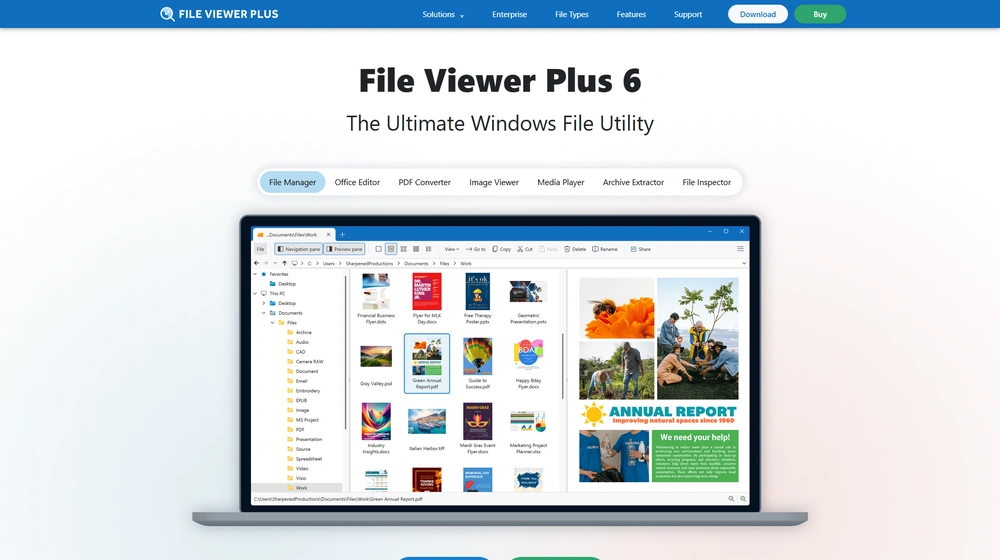
- Robust File Manager: Full-featured Windows Explorer replacement with move, copy, rename, delete, split views, and thumbnail previews—even for formats Windows doesn’t natively support.
- Archive/Compression Utilities: Extract or decompress ZIP, 7Z, RAR, JAR, and more, with selective file decompression.
- Unknown File Identification: Inspect, preview, and even identify files missing extensions or using custom formats.
- Enterprise/Business Features: Save favorite locations, manage large file repositories, and automate manual file tasks at scale.


Workflow & User Experience
- All-in-One Hub: Replace half a dozen single-purpose viewers with one seamless app. Navigate via a modern, tabbed UI optimized for speed.
- Instant Thumbnails & Previews: View custom-generated thumbnails and live file previews without opening separate viewers.
- Batch Everything: Drag in hundreds of files—documents, images, media—and apply batch conversions, exports, or renaming in minutes.
- Light & Dark Modes: Choose your preferred working environment for marathon file-sorting sessions.
- Profile-Driven Customization: Developers and tinkerers can save presets, automate conversion chains, and adjust settings by file type.
File Viewer Plus Pricing
| Plan | Key Features | Pricing |
|---|---|---|
| Trial | 14-day access, all features, no credit card required | Free |
| Standard (One-time license) | All features, 1 Windows PC, basic support | $49.95 (one-time) |
| Business Volume | Multi-user, centralized deployment, priority support | Custom Quote |
| Enterprise | Unrestricted devices, admin management, API (planned), compliance tools | Custom Quote |
File Viewer Plus vs Alternatives
| File Viewer Plus | Windows Explorer* | Universal Viewer | Docs/Media Apps (premium) | |
|---|---|---|---|---|
| Supported File Types | 400+ | <50 (native) | ~100 | Limited/set per-app |
| Batch Conversion | Yes | No | Partial | Rare |
| Editing (Office/PDF/Images) | Full (built-in editors) | No | View only | Per-app |
| Archive & Decompression | Yes | Partial/No | Partial | No |
| Unknown File Analysis | Auto-identify, preview | No | No | No |
| Business Licensing/Support | Yes (multi-user, priority) | No | No | Often limited |
| Price Model | One-time or custom/quote | Included | Freemium | Subscription/multiple |
Pro Tip: Instead of patchwork tools and troubleshooting, power users and IT teams can deploy File Viewer Plus to standardize file operations, reduce support tickets, and increase productivity across the board.

Integrations
- Microsoft Office: Direct open/edit/save for Word, Excel, PowerPoint.
- CAD/Photos: Comprehensive support for DICOM, RAW, SVG, and more.
- Windows Ecosystem: Replaces and enhances default Explorer, media, and image tools.
- API integrations for enterprise automation and management are planned (2025+).
Pros & Cons
| Pros | Cons |
|---|---|
|
|
Final Thoughts
For SMBs, entrepreneurs, or IT teams tasked with managing a complicated digital landscape, File Viewer Plus has become an essential utility. By supporting more than 400 file formats and consolidating everyday file operations, FVP eliminates the friction of format incompatibility, accelerates routine workflows, and reduces reliance on patchwork solutions. With affordable, scalable licensing and consistent evolution into 2025, it stands out as a smart investment for Windows-based organizations.
File Viewer Plus FAQ
Yes, it meets GDPR standards and supports HIPAA via a signed BAA on eligible plans.
Yes, white-label portals support your domain, favicon, and brand visuals.
Ideal for consultants, service firms, and SMBs needing streamlined collaboration.
No—integrates with both. Stripe powers payments; QuickBooks handles accounting.
All plans include chat/email; premium tiers add onboarding and 1:1 setup help.




