
Driven by the relentless demands of modern data analytics, Databox positions itself as a leading all-in-one platform for consolidating business metrics, streamlining reporting, and unlocking actionable insights. For entrepreneurs, agencies, and SMB owners, Databox promises a no-code experience designed to unify and visualize data from every critical source—all without complicated setups or heavy IT involvement.
From Launch to 2026: Databox Timeline
- 2015–2017: Launched to help SMBs automate KPI tracking and dashboarding.
- 2018–2020: Expanded native integrations, introduced mobile apps, custom metrics builder, and agency-targeted white labeling.
- 2021–2023: Rolled out advanced data calculations, Goal Tracking, Alerting, and Performance Scorecards. Enterprise adoption increased.
- 2024: Unified datasets, embedded AI-driven insights, deeper workflow automation, and rapid connector library growth.
- 2026 (projected): Databox evolves toward a connected business intelligence hub, providing predictive analytics, collaboration tools, and accessible data storytelling for decision makers and operational teams.
Key Features
- No-Code Dashboard Builder: Drag-and-drop interface for rapid dashboard creation—no technical skills needed.
- Multi-Source Data Integration: 100+ connectors for CRMs, marketing tools, sales, support, databases, and spreadsheets.
- Real-Time Metrics & Alerts: Live data monitoring, automated alerts, and goal tracking to keep teams aligned.
- Calculated Metrics & Custom Formulas: Build custom KPIs and aggregate complex data from multiple sources.
- Data Sharing & Collaboration: Share dashboards, create scheduled reports, and assign roles for teams or clients.
- White-Label & Client Portals: Custom branding, client-facing portals, and domain mapping for agencies/consultants.
- AI-Powered Insights: Automatic data narrative generation, anomaly detection, and performance suggestions (emerging feature set).


Workflow & User Experience
- Setup: Guided onboarding makes it easy for new users to connect data and launch dashboards within minutes. The platform recommends templates based on industry, stack, and goals.
- Dashboarding: Drag-and-drop widgets, easy resize/arrangement, and hundreds of prebuilt visualizations simplify the design process.
- Collaboration: Real-time sharing, comment threads, and scheduled exports support data-driven meetings and async review. Client-facing access (with permission controls) is a boon for agencies.
- Mobile Experience: Native iOS/Android apps and visually responsive web dashboards for on-the-go accessibility.
- Support & Knowledge Base: 24/5 live chat, extensive help library, and onboarding webinars for teams at every technical level.
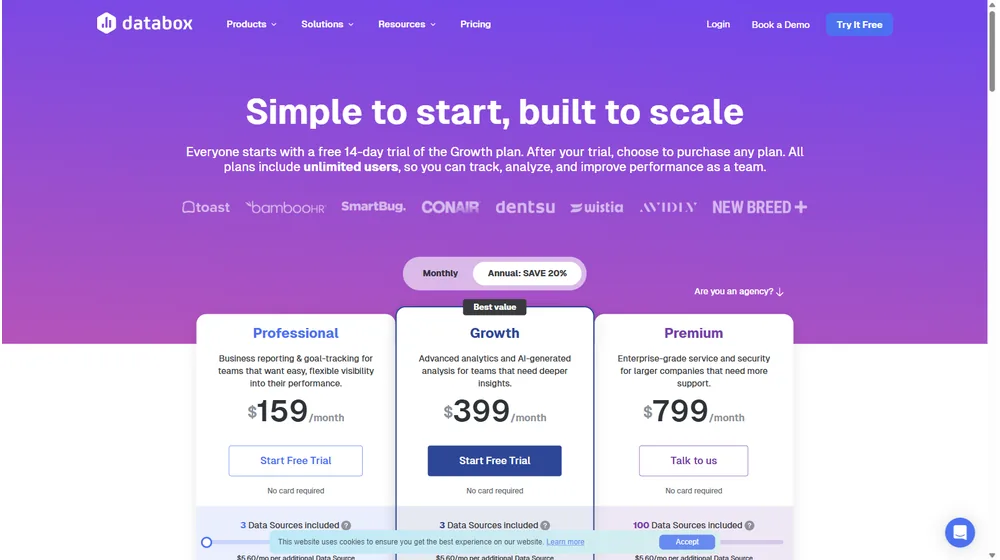
Databox Pricing
| Plan | Connectors | Dashboards & Users | Key Features | Pricing |
|---|---|---|---|---|
| Free | 3 data sources | 3 dashboards (unlimited viewers) | Basic reports, mobile app | $0/mo |
| Starter | 10 data sources | 10 dashboards | Calculated metrics, goal tracking | $72/mo |
| Professional | 25 data sources | 25 dashboards, unlimited users | Scheduled snapshots, attribution, white-labeling | $135/mo |
| Performer | 50+ data sources | Custom dashboards | API, advanced formulas, premium support | $231/mo |
| Enterprise | Unlimited sources | Custom | Dedicated CSM, SLA, SSO, audit logs | Custom Quote |
Databox vs Competitors
| Platform | Core Strengths | Ideal For | Entry Price |
|---|---|---|---|
| Databox | No-code setup, agency/client focus, AI insights, real-time sharing | SMBs, agencies, non-technical teams | $0/mo (Free) |
| Google Data Studio | Free, strong with Google data, custom viz | Marketing teams with Google stack | $0/mo |
| Tableau | Enterprise analytics, deep data modeling | Large orgs, advanced BI teams | $70/user/mo |
| Klipfolio | Custom data connectors, modern UI | SMBs needing data from hard-to-reach sources | $49/mo |
| Power BI | Microsoft-native, strong modeling | MS-centric orgs, IT-led analytics | $10/user/mo |
Pro Tip: Leverage Databox‘s template gallery to put dashboards in front of stakeholders in minutes—get buy-in fast and iterate with real-world feedback.

Integrations
- Supports 100+ native connectors, including Google Analytics, HubSpot, Salesforce, QuickBooks, Facebook Ads, Shopify, Stripe, MySQL, Excel, and more.
- Prebuilt API integrations and Zapier support extend connectivity to 2,000+ SaaS and on-premise apps.
- Custom SQL, REST APIs, and spreadsheet upload for proprietary or unusual data sets.
Pros & Cons
| Pros | Cons |
|---|---|
|
|
Final Thoughts
Databox is an excellent choice for SMBs, service providers, and agencies seeking to unify data, monitor KPIs, and accelerate decision making—all while minimizing technical overhead. Its no-code approach, stellar UX, and evolving AI features keep it at the forefront of modern business intelligence. While high-volume or highly technical teams may outgrow aspects of the platform, most entrepreneurs will find the power-to-simplicity tradeoff to be compelling. Ready to put your data to work? Explore Databox today.
Databox FAQ
Yes, it meets GDPR standards and supports HIPAA via a signed BAA on eligible plans.
Yes, white-label portals support your domain, favicon, and brand visuals.
Ideal for consultants, service firms, and SMBs needing streamlined collaboration.
No—integrates with both. Stripe powers payments; QuickBooks handles accounting.
All plans include chat/email; premium tiers add onboarding and 1:1 setup help.




