

Travel Code continues to redefine travel operations management for agencies and consultants in 2026. Designed to centralize and automate booking, collaboration, and operations, Travel Code stands out as a digital backbone for modern travel businesses seeking efficiency and scale—without developer overhead.
From Launch to 2026: Travel Code Timeline
- 2021: Travel Code launches with core booking, itinerary, and automation features for SMB travel agents.
- 2022: Expands to global currency support, user permissions, and CRM-style client management.
- 2023: Adds white-labeled portals, accounting integrations, and supplier invoice workflows.
- 2024: Introduces advanced analytics, multi-language support, and embedded eSignature tools.
- 2026: Focus shifts to API-first extensibility, AI-powered insights, and tight integration with supplier ecosystems.
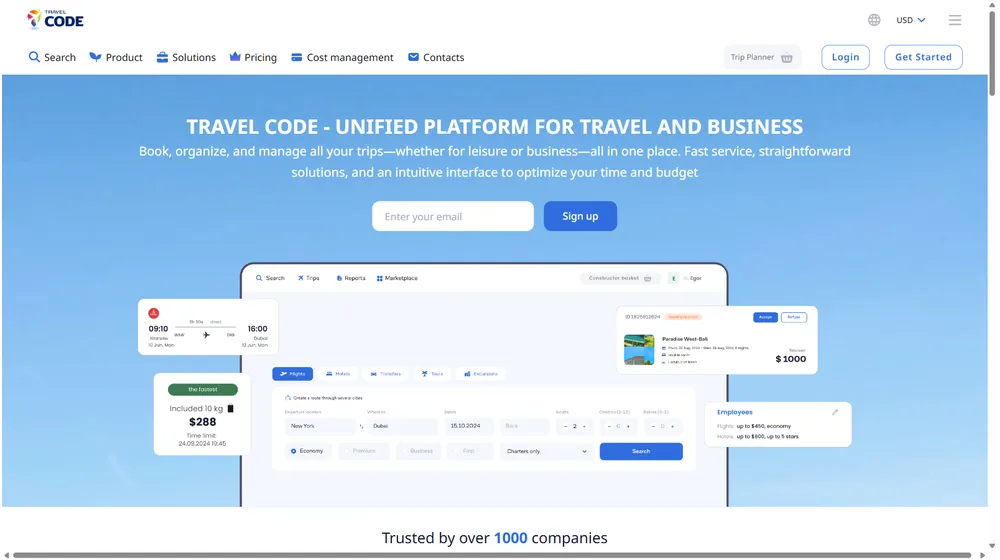
Key Features
- Unified Booking Portal: Centralizes bookings, supplier management, and client communications.
- Automated Operations: Invoices, payment reminders, and documentation handled with customizable workflows.
- Collaboration & White Label: Branded client portals with secure access, messaging, and digital document exchange.
- Analytics Dashboard: Real-time metrics across bookings, revenue, commissions, and performance trends.
- Accounting & Payments: Integrates with major accounting and payment platforms (see Integrations) for seamless financial ops.
- Custom Automation: No-code rules for repetitive tasks—send alerts, auto-assign agents, trigger supplier updates.
- Multi-Currency/Multilingual: Localize communications and payment processing for global clients.


Workflow & User Experience
- Intuitive drag-and-drop interface—minimizes onboarding for new staff.
- Mobile-optimized dashboard for bookings, approval, and notifications on-the-go.
- Role-based permissions—grant accountant, advisor, and client views as required.
- Templated workflows with API connectivity support expanding business logic or custom integrations.
Travel Code Pricing
| Plan | Key Features | Pricing |
|---|---|---|
| Starter | Booking portal, 1 user, client CRM, basic automations | $69/mo (est.) |
| Growth | White-label portals, workflow automation, reporting, 5 users | $149/mo (est.) |
| Enterprise | API, custom workflows, unlimited users, priority support | Custom/Quote |
Travel Code vs Alternatives
| Product | Top Strengths | Notable Limits |
|---|---|---|
| Travel Code | Unified portal, automation, white-label, integrated payments | Requires annual for best pricing; deep customization needs API |
| TravelPerk | Expense management, traveler app | No white-label; not built for client agencies |
| Travefy | Simple itinerary builder | Limited accounting; less automation |
| Sage Travel | Advanced analytics | Less focus on supplier/agency portals |
Pro Tip: Agencies using Travel Code report a 40% cut in paperwork and a 25% growth in client conversion after automating onboarding and payment reminders.

Integrations
- Stripe & PayPal payments
- Xero, QuickBooks accounting
- Gmail/Outlook messaging integration
- Document eSignature (Docusign, HelloSign)
- Calendar & Google Workspace (via Zapier/API)
- Supplier API feeds (for eligible Enterprise clients)
Pros & Cons
| Pros | Cons |
|---|---|
|
|
Final Thoughts
Travel Code positions itself as the all-in-one SaaS backbone for modern travel agencies, consultancies, and booking businesses through 2026. Standout strengths include white-label client portals, automation-first design, and unified financial integrations. While some advanced features require enterprise-tier investment, the out-of-the-box experience is robust and scalable. For agencies prioritizing client experience, automation, and operational agility, Travel Code is a best-in-class contender to consider.
Travel Code FAQ
Yes, it meets GDPR standards and supports HIPAA via a signed BAA on eligible plans.
Yes, white-label portals support your domain, favicon, and brand visuals.
Ideal for consultants, service firms, and SMBs needing streamlined collaboration.
No—integrates with both. Stripe powers payments; QuickBooks handles accounting.
All plans include chat/email; premium tiers add onboarding and 1:1 setup help.




