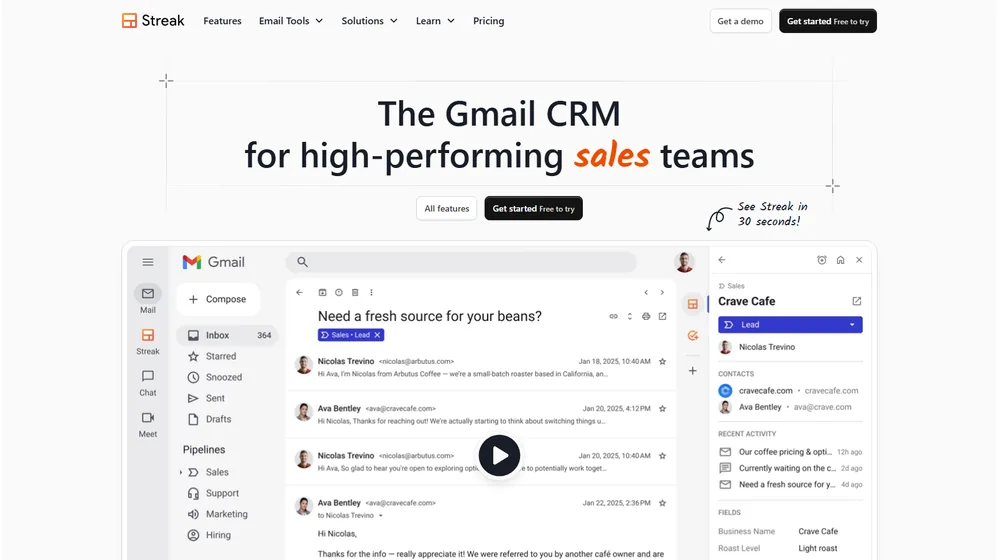
Streak – CRM for Gmail positions itself as the go-to CRM for SMBs and modern teams, integrating directly into Gmail for an all-in-one pipeline, collaboration, and automation platform that scales into 2026 and beyond. For entrepreneurs and SaaS evaluators seeking simplicity, strong AI-powered data entry, and team-wide adoption, Streak – CRM for Gmail transforms your inbox into an actionable command center—no separate logins or manual data wrangling.
From Launch to 2026: Evolution & Positioning
- 2012-2016: Launched as a Gmail Chrome extension, trusted for lightweight pipeline management and basic tracking.
- 2017-2022: Moved to fully integrated browser CRM, adding team features, permissions, and mobile support.
- 2023-2025: AI-powered features launched—automated email logging, deal timeline, natural language Q&A, and “magic columns.” SMB/SME adoption accelerates.
- 2026 Outlook: Positioned as the leading CRM embedded in Gmail—targeting high-performing, distributed teams frustrated with standalone tools, and expanding AI/automation for routine data capture and collaboration.
Key Features
- Seamless Gmail Integration: Works directly from your inbox—no new tabs or context switching.
- Pipeline & Deal Tracking: Customizable pipelines visible inside Gmail. Deal and contact records are instantly accessible from any thread.
- Automated Email Logging: Every team touchpoint and message is logged on the deal timeline, eliminating incomplete records.
- AI Data Entry & Insights: AI automatically fills contact fields, suggests next steps, and enables natural language queries within your pipeline.
- Label & Tagging: Colored pipeline labels in the inbox connect emails to deals, marketing, or support—all from one view.
- Standard CRM Functions: Task management, contact management, deal comments, mail merge, data validation, call integrations, permissions, and funnel/income reports—robust, but not overwhelming.
- Collaboration & Permissions: Share pipelines, comments, and updates instantly. Control team-wide visibility and email-sharing settings.
Workflow & User Experience
- Onboarding: Quick Gmail-based setup—no new UI to learn. Import via spreadsheets or manual entry.
- UI/UX: All features live in Gmail’s familiar interface, with minimal disruption. Mobile apps available for deal updates and notifications on the go.
- Collaboration: Teammates see shared deals, email histories, activity timelines, and can comment and assign tasks—all while working in their inbox.
- Workflow Automation: Routine data entry, stage changes, and follow-ups handled by AI, freeing teams from busywork. Bulk mail merge and prospecting tools built in.
- Adoption: High, due to zero context switching; ideal for teams who resist classic CRM overhead.
Streak – CRM for Gmail Pricing
| Plan | Core Features | Pricing (per user, mo) |
|---|---|---|
| Free | Basic pipelines, email tracking, 1 personal inbox | $0 |
| Solo | 1 user, mail merge, reminders, basic integrations | $15 |
| Pro | Unlimited pipelines, advanced mail merge, AI insights, 5,000 contacts, team collaboration | $49 |
| Enterprise | All Pro + advanced permissions, custom reporting, API, HIPAA compliance, dedicated support | Custom |
Streak – CRM for Gmail vs Alternatives
| CRM | Best For | Gmail Integration | AI/Automation | Pricing |
|---|---|---|---|---|
| Streak – CRM for Gmail | Teams living in Gmail, rapid adoption | Native (inbox) | Yes (AI data fill, next steps) | Free–$49+/mo |
| HubSpot CRM | Marketing-heavy, all-in-one suite fans | Plug-in/Chrome extension | Basic | Free–$50+/mo |
| Pipedrive | Visual pipelines, sales-centric SMBs | Extension/Plug-in | Moderate | $21+/mo |
| Close CRM | Remote sales and calling teams | Limited | Strong (calling, sequences) | $49+/mo |
| Zoho CRM | Custom workflow, global orgs | Plug-in/API | Yes (with add-ons) | $18+/mo |
Pro Tip: For SMBs and consultants whose workflow revolves around Gmail, choosing Streak – CRM for Gmail can mean instant adoption across teams—no separate onboarding or complicated integrations.

Integrations
- Gmail (native integration)
- Google Workspace (Contacts, Calendar, Sheets, Drive)
- Zapier (connect dozens of SaaS & productivity apps)
- Slack, Intercom, Dialers, and popular productivity tools (direct and via Zapier)
Pros & Cons
| Pros | Cons |
|---|---|
|
|
Final Thoughts
For SMBs, consultants, and teams that live in Gmail, Streak – CRM for Gmail stands out by removing every barrier to CRM adoption. AI-driven timelines, instant collaboration, and inbox-native workflows support high-performing teams—without the learning curve or resistance of classic CRMs. For organizations seeking a CRM that your team will truly use, Streak is the market leader in streamlining pipeline and relationship management directly from the world’s most-used inbox.

Streak – CRM for Gmail FAQ
Yes, it meets GDPR standards and supports HIPAA via a signed BAA on eligible plans.


Yes, white-label portals support your domain, favicon, and brand visuals.
Ideal for consultants, service firms, and SMBs needing streamlined collaboration.
No—integrates with both. Stripe powers payments; QuickBooks handles accounting.
All plans include chat/email; premium tiers add onboarding and 1:1 setup help.
This post may contain affiliate links and we may earn commissions. Learn more in our disclosure.