If you’re evaluating CRMs for B2B teams, Salesflare stands out in 2026 as an intelligent, automation-rich solution focused on small and medium-sized businesses. This review explains how Salesflare has evolved, what sets it apart from competitors, and whether it’s the right fit for scaling your sales pipeline this year.
From Launch to 2026: Salesflare’s Evolution
- 2014–2017: Launched to automate data entry for lead tracking, targeting lean B2B sales teams.
- 2018–2020: Introduced automatic email, contact, and meeting tracking; rolled out integrations for LinkedIn, Outlook, Gmail, and mobile devices.
- 2021–2023: Embedded more automation (reminders, enrichment), improved sales analytics dashboards, and doubled down on user experience.
- 2024–2026: AI-driven pipeline suggestions, lead enrichment, multi-channel engagement, and open ecosystem integrations define the platform’s smart, no-nonsense positioning.
Key Features
Sales Intelligence & Automation
- Automatic lead, contact, and activity tracking from email, calendar, and LinkedIn
- AI-powered pipeline management and reminders to nudge follow-up
- Data enrichment from public and private sources—no manual entry needed
Sales Workflow & Engagement
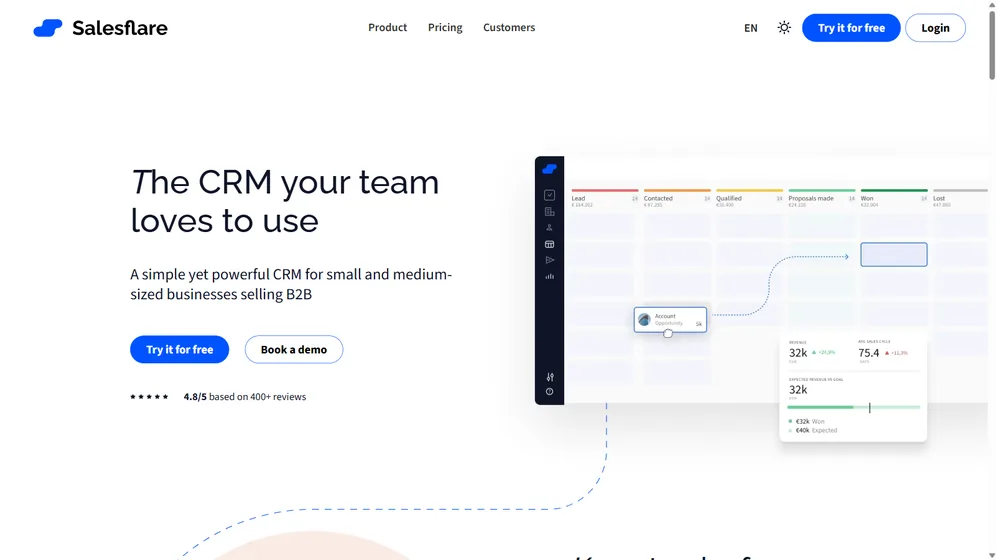
- Visual pipeline with drag-and-drop stages, custom fields, and instant forecasting
- Automated email sequences and built-in templates for customer and lead outreach
- Multi-channel engagement (LinkedIn, email, web tracking) with engagement analytics
Collaboration & Team Transparency
- Shared timelines and notes; see activity for any lead or account in real time
- Role-based controls and coaching tools for reps, managers, and business owners
Mobile & Integrations
- Native iOS and Android apps for updating leads on the go
- Seamless Gmail, Outlook, and LinkedIn integrations; Chrome extension for lead capture
- API, workflow automation, and prebuilt integrations with leading SaaS products
User Workflow & Experience
- Onboarding in minutes—connect your email to populate leads, contacts, and activity automatically
- Pipeline overview is visually driven; advance deals by simply dragging their stage
- Reminders and AI suggestions highlight accounts that require attention, reducing risk of overlooked leads
- Collaboration is frictionless: any user can see communications, notes, and changes on every opportunity
Salesflare Pricing
| Plan | Key Features | Pricing |
|---|---|---|
| Growth | Full pipeline tracking, auto data enrichment, up to 3 users | $29/user/mo |
| Pro | Workflow automations, advanced analytics, email sequences, up to 10 users | $49/user/mo |
| Enterprise | Custom roles, advanced permissions, premium support | Custom/Quote |
How Salesflare Compares
| Salesflare | HubSpot | Pipedrive | Zoho CRM | |
|---|---|---|---|---|
| Intelligent Automation | Advanced (auto enrichment, AI reminders) | Basic (higher tiers) | Moderate | Moderate |
| Email & LinkedIn Integration | Native, seamless | Requires add-ons | Available | Available |
| Ease of Use | Excellent—built for SMBs | Good—more features, more complexity | Good | Moderate |
| Real-Time Collaboration | Yes (timeline, notes, permissions) | Partially | Partially | Partially |
| Starting Price | $29/mo/user | Free (very limited), $50+ for sales teams | $21/mo/user | $20/mo/user |
Pro Tip: SMBs often see full pipeline visibility and improved onboarding within the first week of switching to Salesflare. Minimal manual entry and real-time team updates are the biggest time-savers reported in 2026.

Integrations
- Email: Gmail, Outlook, Office 365
- LinkedIn (native and via Chrome extension)
- Calendar sync
- Mobile apps (iOS, Android)
- API + prebuilt connections for Zapier and other popular SaaS tools
Pros & Cons
| Pros | Cons |
|---|---|
|
|
Final Thoughts
For SMBs selling B2B, Salesflare is one of 2026’s sharpest choices for pipeline automation and sales intelligence. Competitors may offer broader suites, but few match its blend of usability, automation, and value for fast-moving sales teams.

Salesflare FAQ
Yes, it meets GDPR standards and supports HIPAA via a signed BAA on eligible plans.


Yes, white-label portals support your domain, favicon, and brand visuals.
Ideal for consultants, service firms, and SMBs needing streamlined collaboration.
No—integrates with both. Stripe powers payments; QuickBooks handles accounting.
All plans include chat/email; premium tiers add onboarding and 1:1 setup help.
This post may contain affiliate links and we may earn commissions. Learn more in our disclosure.