

For brands and creators competing for attention in 2026, live video is non-negotiable. Restream promises to simplify multistreaming, audience engagement, and branded content—without the tech headaches that slow businesses down.
From Launch to 2026: The Restream Timeline
- 2015–2018: Restream emerges as a technical relay, helping early creators stream to Twitch, YouTube, and Facebook simultaneously.
- 2019–2022: Adds Restream Studio, direct browser-based production, workflow templates, and integrations with tools like OBS and Zoom. Multichannel chat and analytics debut.
- 2023–2024: Branding tools, guest channels, file uploads, and full HD support expand. Target audience broadens to include SMBs, agencies, corporate comms, and educators.
- 2026+: Prioritizes AI-powered production tools, granular analytics, multi-brand management, and open integrations. Restream positions itself as the command center for omnichannel live video delivery, sized for businesses that refuse friction or limitations.
Key Features of Restream
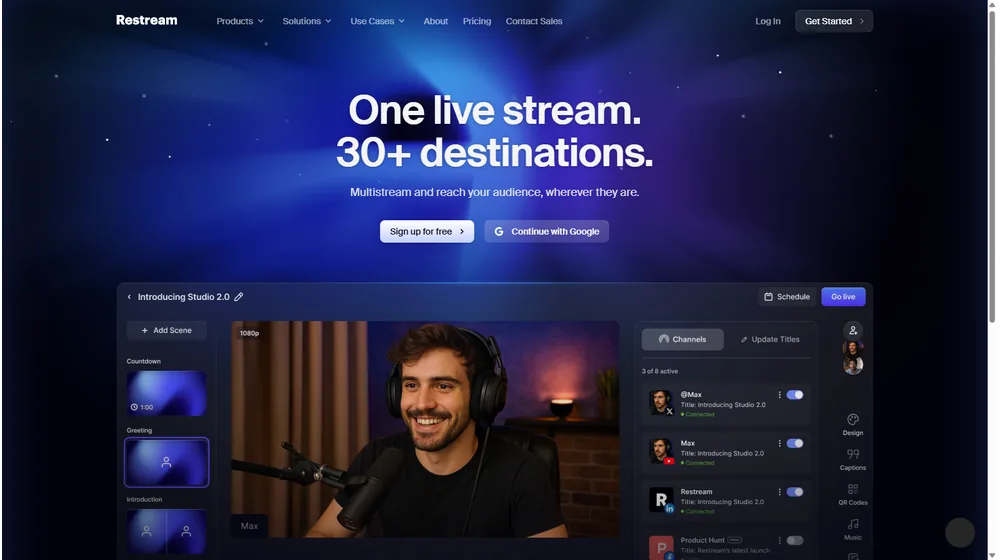
- Multistream Delivery: Go live on YouTube, LinkedIn, Facebook, Twitch, and dozens more simultaneously.
- Restream Studio: No download needed. Launch live shows, add guests, screen share, and customize on-brand graphics directly in-browser.
- Brand Customization: White-label with your logos, overlays, and lower-thirds—remove Restream branding on paid plans.
- Integrated Multi-Platform Chat: Aggregate audience comments from all destinations to engage in one place.
- Cloud Video Upload & Scheduling: Securely upload pre-recorded video, then schedule for live playback on all platforms.
- AI-Powered Analytics: Track stream health, audience demographics, watch time, and simultaneous viewers across channels—one unified dashboard.
- Advanced Recording: Offload full streams (up to 10 hours/stream) and separate audio tracks for post-production.
- Guest Channel Streaming: Expand distribution by streaming directly to guests’ profiles—perfect for collabs and influencers.
- Team Roles & Collaboration: Add team members, assign roles, and manage workflow permissions (on higher plans).


Workflow & User Experience
- Setup: Account creation takes minutes, with onboarding tailored to your preferred workflow (studio, encoder, upload).
- Streaming: Connect destinations, set up branding, invite guests, and go live in-browser or from tools like OBS/XSplit.
- Scheduling: Promote and schedule future streams or events, automate go-live, and manage pre-recorded content.
- Interactivity: Monitor and reply to live chat comments from all connected platforms in one dashboard.
- Reporting: Access cross-channel analytics post-stream, with export options and actionable recommendations.
- Support: 24/7 chat, help center, contextual tips throughout the app, and priority support on premium tiers.
Restream Pricing
| Plan | Key Features | Pricing |
|---|---|---|
| Basic | Multistream 2 channels, screen sharing, integrated chat, 6 participants, Restream branding | $0/mo |
| Standard | Multistream 3 channels, no branding, custom graphics, 10 participants, guest channels, 6h recording | $19/mo (or $190/y) |
| Professional | Multistream 5 channels, full HD, split audio, upload/schedule, 10h recording, priority support | $49/mo (or $470/y) |
Restream vs Alternatives
| Feature | Restream | StreamYard | Switcher Studio | OBS Studio |
|---|---|---|---|---|
| Browser-Based Studio | Yes | Yes | No | No |
| Multistream Destinations | 2–5+ (plan-based) | 3–8 (plan-based) | iOS only, limited | Unlimited (manual config) |
| Brand Customization | Full (Pro+) | Partial | Full | Custom (but complex) |
| Integrated Chat/Analytics | Yes/Yes | Yes/Yes | No/Partial | No/No |
| AI Features | Emerging (2026+) | Limited | No | No |
| Best For | SMBs, agencies, pros | Non-tech creators | Mobile video, events | Technical users |
Pro Tip: For maximum flexibility and branding, move up from Restream’s free plan to Standard or Professional tiers. This unlocks white labeling, guest channels, and removes Restream branding—giving your live video complete ownership and reach.

Integrations
- Connects natively with OBS, Zoom, Ecamm Live, XSplit, and most RTMP-enabled software
- LinkedIn Live, YouTube, Facebook, Twitch, and 30+ direct streaming destinations
- Zapier and select API endpoints for workflow automation (Standard+)
- Bulk upload via cloud drive (Pro+)
Pros & Cons
| Pros | Cons |
|---|---|
|
|
Final Thoughts
For SMBs, brands, agencies, and ambitious creators seeking frictionless, professional-grade livestreaming, Restream delivers the rare blend of usability and power. Its browser studio, evolving AI analytics, multichannel chat, and deep branding features address the gaps that plague simpler tools or overly technical DIY alternatives. With a robust free tier and competitive pricing, Restream stands as a ready command center for omnichannel video in 2026—and a long-term home for brands that value control, flexibility, and growth.
Restream FAQ
Yes, it meets GDPR standards and supports HIPAA via a signed BAA on eligible plans.
Yes, white-label portals support your domain, favicon, and brand visuals.
Ideal for consultants, service firms, and SMBs needing streamlined collaboration.
No—integrates with both. Stripe powers payments; QuickBooks handles accounting.
All plans include chat/email; premium tiers add onboarding and 1:1 setup help.




