

InVideo stands out in 2026 as a cloud-based AI video generator, offering entrepreneurs and SMBs a rapid way to turn ideas into high-quality videos—no editing expertise or creative team required. Learn how InVideo leverages AI automation, workflow design, and a deep stock media library to empower business storytelling and marketing at scale.
From Launch to 2026: InVideo’s Evolution
- Launch: Entered as an online video editor and template provider for marketers.
- 2022–2023: Added basic AI tools and integrated stock media.
- 2024: Transitioned into an AI-first platform—automating not just editing, but script generation, voiceovers, and full video assembly.
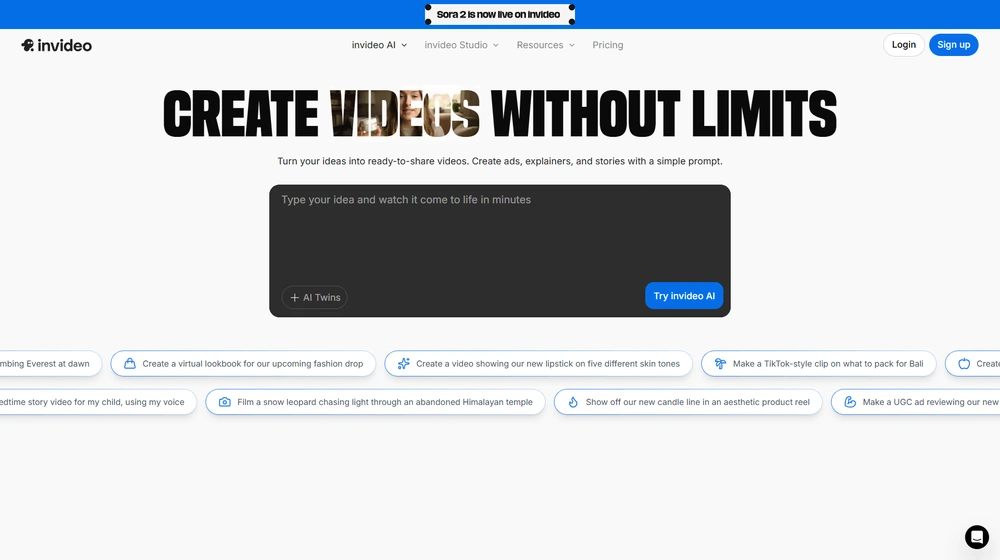
- 2025: Now positions as an all-in-one, web-based AI video generator: just give a prompt, get a ready-to-publish video with subtitles, music, and transitions. 25M+ users and strong momentum across 190+ countries.
Key Features by Capability
- Text-to-Video AI: Instantly generate videos from a text prompt. AI scripts, narrations, media, music, and transitions.
- Massive Stock Library: 16M+ stock videos and images, searchable and automatically recommended by AI.
- AI Voiceovers: Realistic, human-sounding narrator voices in multiple languages and accents.
- Prompt Editing: Adjust videos via text instructions—change scenes, voice style, script, or tone without timeline complexity.
- Web-first, No Downloads: 100% browser-based; works on all major platforms and devices.
- Templates & Workflows: Guided flows for audience selection, platform optimization (YouTube, TikTok, etc.), and style presets.
- Collaboration: Multiplayer real-time editing announced (full release pending).


Workflow & User Experience
- Step 1: Prompt your idea or content goal—just text, no format required.
- Step 2: Select your audience, platform, and desired style.
- Step 3: Edit the auto-generated script/voiceover/media with simple clicks or written prompts.
- Step 4: Polish via intuitive refinements in the editor, or make scene-level changes via prompt box.
- Step 5: Export and publish—no watermark, high-res outputs (with paid plans).
InVideo Pricing
| Plan | Key Features | Pricing |
|---|---|---|
| Free | 10 video mins/week, 1 AI credit, limited avatars, watermark, basic export | $0 |
| Business | HD exports, no watermark, large media library, 60 exports/mo | ~$30/mo (annual discounts) |
| Unlimited | All features, unlimited exports, largest media limits, priority support | ~$60/mo (annual discounts) |
| Enterprise | Custom security, unlimited workflows, custom integrations, advanced SLAs | Custom/Quote |
InVideo vs The Competition
| Product | Best For | AI Automation | Media Library | Pricing (est.) |
|---|---|---|---|---|
| InVideo | SMBs, marketers, entrepreneurs | End-to-end (script, voice, video assembly) | 16M+ included | Free–$60/mo |
| Lumen5 | Content teams | AI script/scene, less voiceover automation | 3M+ included | From $29/mo |
| Promo.com | Ad creators, agencies | Template-based, manual assembly | Over 100M (usage/cost varies) | $49–$359/mo |
| Pictory | YouTube, UGC, short-form | Strong AI editing, limited in-app voice | Stock + upload | From $19/mo |
Pro Tip: For scale and speed, prompt-based AI editing in InVideo can save hours per project—especially for YouTube, ads, or explainer content. Test free, but paid plans unlock brand control and watermark-free exports.

Integrations
- Stock asset integrations—media partners (iStock, Shutterstock, Storyblocks) included for paid tiers.
- YouTube, social platform optimizations built-in.
- Collaboration/real-time multiplayer editing in development; no direct Zapier/API as of 2025.
Pros & Cons
| Pros | Cons |
|---|---|
|
|
Final Thoughts
For SMBs, solopreneurs, and teams looking to create scale-worthy video content without workloads or overhead, InVideo offers a compelling, AI-first SaaS alternative to complex video editing suites. Its capacity to move from prompt to publish in minutes—while maintaining professional output—sets it apart in the AI content era, especially as video becomes a top channel for engagement in 2026 and beyond.
InVideo FAQ
Yes, it meets GDPR standards and supports HIPAA via a signed BAA on eligible plans.
Yes, white-label portals support your domain, favicon, and brand visuals.
Ideal for consultants, service firms, and SMBs needing streamlined collaboration.
No—integrates with both. Stripe powers payments; QuickBooks handles accounting.
All plans include chat/email; premium tiers add onboarding and 1:1 setup help.




