
As workforce automation and hybrid work models become mainstream, Hubstaff positions itself for 2026 as a single source of truth for SMB productivity, payroll, and team accountability—without complex setup or IT overhead.
From Launch to 2026: The Hubstaff Timeline
- 2012: Hubstaff launches as a remote time tracking app for freelancers and agencies.
- 2015–2020: Expands to include payroll, project management, GPS/location tracking, and integrations (e.g., Asana, Trello, QuickBooks Online).
- 2021–2024: Adds automation rules, advanced analytics, streamlined screenshots, and mobile-first UX. Shifts focus to distributed teams and professional services firms.
- By 2026: Full workforce automation suite: policy-driven time enforcement, automated payroll & billing, AI-powered operations insights, and plug-and-play APIs for business systems. Positioned as an all-in-one compliance automation hub for SMBs scaling flexible work.
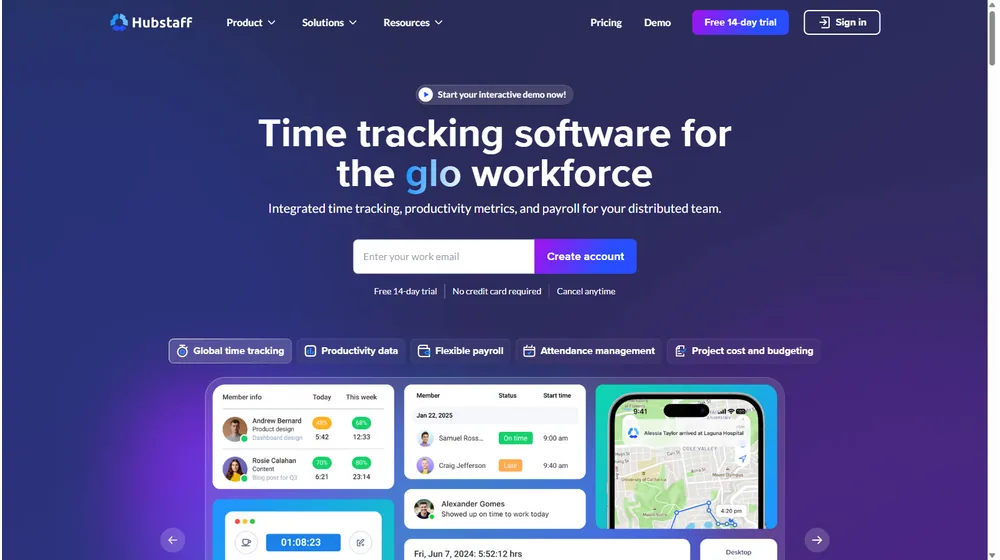
Key Features
- Time Tracking: Automatic, manual, GPS/location-aware, web, or app-based—tailored by role or device.
- Payroll Automation: Supports multi-country payments, custom pay rates, and automatic timesheet approval workflows.
- Project & Budget Management: Project/task-level costing, activity monitoring, and dashboards.
- Productivity Analytics: Activity rates, idle time alerts, and screenshot verification—all customizable.
- Compliance Tools: Built-in work policy enforcement, audit trails, and regulatory reporting.
- Team Messaging: Light-weight in-app communication and automated alerts/notifications.
- Integrations: Connects to PM, payroll, and accounting platforms (e.g., QuickBooks, Gusto, Asana, Jira, Zapier).
Workflow & UX
- Modern, mobile-responsive web dashboard; native mobile/desktop apps for tracking and approval.
- Role-based permissions and project-specific visibility.
- Automated onboarding wizard for teams.
- Bulk actions for admins; self-serve report downloads; granular and scheduled notifications.
- Clear compliance status and real-time activity feeds.
Hubstaff Pricing
| Plan | Key Features | Pricing |
|---|---|---|
| Time Free | 1 user, basic tracking, limited reports | $0/mo |
| Time Starter | All basic tracking, budgets, scheduling | $7/user/mo |
| Time Pro | Advanced time tracking, invoicing, payments | $10/user/mo |
| Enterprise | Full compliance tools, access controls, custom SLA | Custom Quote |
Hubstaff vs. Alternatives
| Product | Best For | Notable Strength | Weakness |
|---|---|---|---|
| Hubstaff | SMBs, agencies, distributed teams | Full automation, compliance tools | Some features gated to higher tiers |
| Harvest | Freelancers, small teams | Simplicity, invoicing | Less powerful compliance, fewer management tools |
| Toggle Track | Startups, individuals | UX, ease of use | Minimal payroll, limited enterprise features |
| ClickTime | Consulting, pro services | Budget/project visibility | Steeper learning curve |
Pro Tip: Evaluate Hubstaff‘s trial using your real workflows. Automation rules for payroll, time-off, and compliance are its biggest competitive levers for scaling teams with minimal admin burden.

Integrations
- Accounting: QuickBooks Online, FreshBooks, Xero
- Payroll: Gusto, PayPal, Wise
- Project Management: Asana, Trello, Jira, ClickUp
- Communication: Slack, MS Teams
- Zapier: Hundreds of automated connections to CRMs, invoicing, HR
Pros & Cons
| Pros | Cons |
|---|---|
|
|
Final Thoughts
Hubstaff‘s evolution toward automation and compliance uniquely prepares SMBs for the next era of hybrid work. If you manage contractors, field teams, or remote collaborations, it stands out for end-to-end payroll, robust controls, and extensibility—balancing oversight with ease of use.
Hubstaff FAQ
Yes, it meets GDPR standards and supports HIPAA via a signed BAA on eligible plans.
Yes, white-label portals support your domain, favicon, and brand visuals.
Ideal for consultants, service firms, and SMBs needing streamlined collaboration.
No—integrates with both. Stripe powers payments; QuickBooks handles accounting.
All plans include chat/email; premium tiers add onboarding and 1:1 setup help.
This post may contain affiliate links and we may earn commissions. Learn more in our disclosure.