Canva is reshaping the way entrepreneurs, small businesses, and enterprises approach visual design—allowing fast, collaborative content creation without the need for advanced design skills. As Canva heads into 2026, its platform focuses on accessible, AI-powered design for team-driven workflows—making it a go-to solution for organizations seeking both speed and creative control. Canva uniquely positions itself as a cloud-first, all-in-one tool for branded content, marketing, and collaboration.
From Launch to 2026
- 2013: Canva launched with a mission to democratize graphic design, targeting non-designers with intuitive, drag-and-drop tools.
- 2016–2020: Product expansion included team features, collaboration, a growing media library, and integrations with top cloud services.
- 2022–2024: AI-powered design recommendations, brand kits, advanced templates, and workflow automation introduced for business users.
- 2025–2026 (Vision): Expanded AI capabilities, deeper project management, enhanced publishing channels, and more granular controls for enterprise branding and compliance.
Key Features
- Intuitive Editor: Drag-and-drop design with real-time collaboration, infinite templates, and automatic resizing for every channel.
- Brand Kit: Store and manage logos, color palettes, fonts, and brand assets—enforcing consistency across teams.
- AI Design Tools: Smart recommendations, text-to-image generation, background removal, and one-click styling powered by proprietary AI.
- Collaboration & Workspaces: Multi-user access, template locking, approval workflows, comments, and task assignment for projects.
- Content Publishing: Direct to social, web, print, and presentation channels from a unified dashboard.
- Asset Libraries: Millions of stock photos, videos, icons, and music, plus organization-wide asset sharing and management.
- Integrations: Connects with Google Drive, Dropbox, Slack, HubSpot, and dozens of other SaaS platforms for seamless workflow embedding.
Workflow & UX
- Quick Onboarding: Most users—regardless of design experience—can start producing brand-level assets after a brief introduction.
- Team Management: Administrators can set permissions, manage teams, and assign brand roles for asset or template creation and review.
- Version Control: Track changes, restore previous versions of assets, and audit team output within projects.
- Extensibility: Canva’s robust app marketplace enables further workflow automation (e.g., Zapier, Mailchimp, LinkedIn publishing).
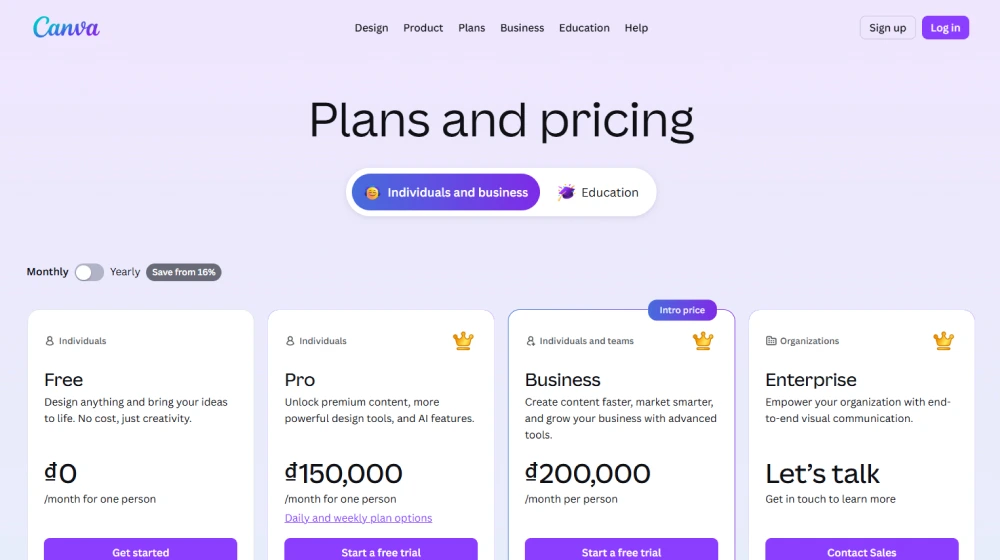
Canva Pricing
| Plan | Key Features | Pricing |
|---|---|---|
| Free | Basic templates, limited storage, up to 5 team members, access to free assets | $0 |
| Pro | Brand Kit, premium templates, AI features, advanced export, unlimited folders | ~$12.99/user/mo |
| Teams | All Pro features, enhanced collaboration, team controls, 24/7 support | From ~$14.99/user/mo |
| Enterprise | SSO, advanced permissions, audit logs, legal & compliance tools, custom SLA | Custom Pricing |
Canva vs. Top Alternatives
| Platform | Ideal For | Core Differentiator | Starting Price |
|---|---|---|---|
| Canva | Teams, SMBs, creators | All-in-one AI design suite; brand control | $0 (Free); $12.99/mo (Pro) |
| Adobe Creative Cloud Express | Designers, freelancers | Adobe ecosystem; Photoshop integration | $9.99/mo |
| VistaCreate | Marketers, social media managers | Social content automation; stock-heavy assets | $13/mo |
| Piktochart | Presentation & infographic teams | Data-driven visuals; reporting templates | $14/mo |
Pro Tip — Use Canva’s Brand Kit to lock down fonts, logos, and pallet guidelines, ensuring every team output is always on-brand—even with frequent turnover.

Integrations
- Popular: Google Drive, Dropbox, Slack, HubSpot, Microsoft Teams, Mailchimp
- Social Publishing: Facebook, Instagram, LinkedIn, Twitter, YouTube
- Enterprise: SSO providers, API access, and workflow automation platforms (e.g., Zapier)
Pros & Cons
| Pros | Cons |
|---|---|
|
|
Final Thoughts
For SMBs, founders, and enterprises aiming to empower entire teams with fast, on-brand design, Canva stands out as the clear SaaS category leader. Its fusion of AI design tools, collaboration, and brand management is unmatched for the price and support included. While others may niche into niche graphic tasks or require steeper learning curves, Canva bridges efficiency and scalability—making it a must-evaluate platform heading into 2026.

Canva FAQ
Yes, it meets GDPR standards and supports HIPAA via a signed BAA on eligible plans.


Yes, white-label portals support your domain, favicon, and brand visuals.
Ideal for consultants, service firms, and SMBs needing streamlined collaboration.
No—integrates with both. Stripe powers payments; QuickBooks handles accounting.
All plans include chat/email; premium tiers add onboarding and 1:1 setup help.
This post may contain affiliate links and we may earn commissions. Learn more in our disclosure.