

Entrepreneurs and SMB owners seeking a reliable, scalable way to generate qualified leads in 2026 are frequently turning to Leadpages—the cloud-based platform that promises high-converting landing pages and agile campaign deployment without developer support. As the SaaS market saturates, does Leadpages retain its competitive edge, or has it been outpaced by newcomers? This review probes the latest updates, product hierarchy, and areas where Leadpages truly shines for modern marketing teams.
From Launch to 2026: Timeline & Evolution
- 2013–2018: Early days focused on SMB landing pages, easy opt-in forms, and growth of the template gallery.
- 2019–2022: Expanded to support full site builder, analytics, pop-ups, alert bars, and growing range of integrations.
- 2023–2024: Rollout of AI-powered content, lead enrichment, team collaboration, and on-page payments.
- 2025: Evolution into a collaborative, data-driven lead optimization platform with native A/B testing, enterprise integrations, and mobile-first UX. Ongoing enhancements to AI assistants, conversion toolkit, and actionable insights distinguish it in an increasingly crowded market.
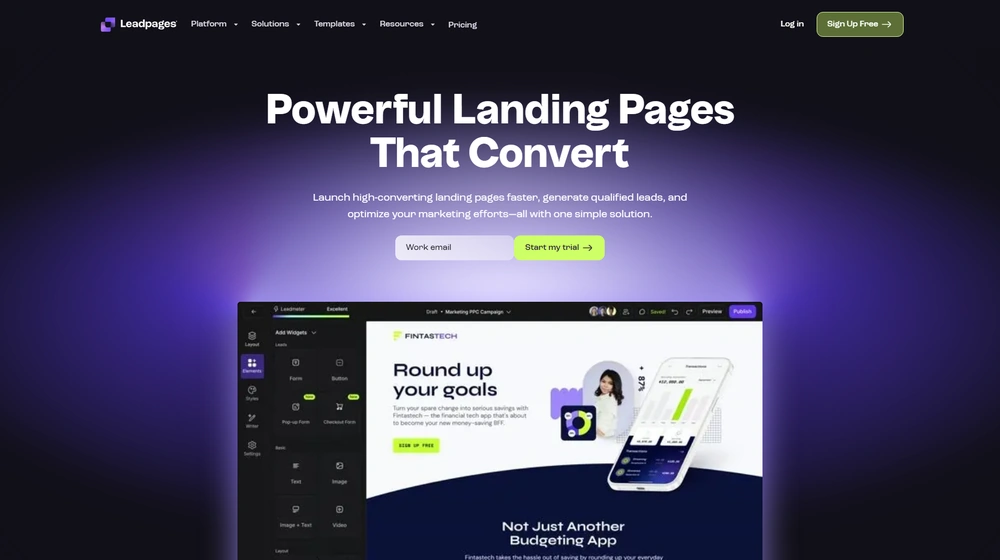
Key Features & Capabilities
- No-Code Page Builder: Intuitive drag-and-drop builder for landing pages, websites, pop-ups, and alert bars; no programming required.
- Data-Driven Lead Capture: AI-powered copy/image generation, template A/B testing, and real-time campaign analytics.
- Lead Enrichment & Management: Auto-fill essential contact details (industry, location, company size); integrated CRM or export to your stack.
- Collaboration Tools: Multi-user teams, granular permissions, inline commenting, and direct feedback.
- Conversion Toolkit: Built-in forms, payment modules, alert bars, and optimization recommendations via the “Lead Meter”.
- Integrations: Robust connections to email (Mailchimp, Hubspot, ConvertKit), payment gateways (Stripe), analytics, CMS, and over 90 third-party apps with Zapier.
- Mobile Optimization: Custom mobile layouts ensure optimal UX across devices.


Workflow & User Experience
- Onboarding & Setup: Guided onboarding with industry templates enables brand publishing within hours.
- Template Management: Access to 250+ professionally designed templates for lead gen, e-commerce, webinars, consultations, and more—all customizable.
- Team Collaboration: Assign workspaces, track feedback in real time, and roll out landing pages without bottlenecking your marketing or design teams.
- Integrated Testing: Run A/B tests on any published asset; detailed analytics for rapid learning cycles.
- Analytics & Tracking: Visual dashboards for conversion metrics, plus integration with Google Analytics, CRMs, and more.
Leadpages Pricing
| Plan | Key Features | Pricing (USD) |
|---|---|---|
| Standard | Landing page/site builder, templates, pop-ups/alert bars, built-in conversions, AI, 1 site, essential integrations, chat/email support | $49/mo (billed annually) or $99/mo monthly |
| Pro | All Standard features + A/B testing, online sales/payments, lead enrichment, unlimited A/B split tests, 3 sites, premium integrations, phone support | $99/mo (billed annually) or $130/mo monthly |
| Advanced | All Pro features + advanced integrations (Salesforce, HubSpot), advanced security, more domains/sites, white-label, dedicated onboarding, priority support | Custom Quote / $399+/mo |
Leadpages vs Competitors
| Feature | Leadpages | Unbounce | Instapage | ClickFunnels |
|---|---|---|---|---|
| No-Code Builder | Yes | Yes | Yes | Yes |
| Integrated AI/Copy Tools | Yes | Limited | Limited | Limited |
| Native A/B Testing | Pro & up | All Plans | All Plans | Funnel only |
| Built-In Payments | Yes (Stripe), Pro & up | Zapier | Custom integration | Yes |
| Team Collaboration Tools | Yes | Yes (higher tiers) | Yes (higher tiers) | Yes |
| Price (Starting, Ann.) | $49/mo | $99/mo | $199/mo | $97/mo |
| Free Trial | Yes (14 days) | Yes | Yes | No (free account option) |
| Best For | Small/Medium Businesses, Agencies | Marketers, Agencies | Enterprises | Funnel Marketers |
Pro Tip: For many marketing teams, Leadpages handles nearly the entire lead capture funnel from creation to enrichment to nurturing, offering deep integrations but very little need for outside tools—making it especially appealing for businesses that want to consolidate their stack.

Integrations
- Email: Mailchimp, ConvertKit, Hubspot, ActiveCampaign, Drip, AWeber
- Payments: Stripe (Pro/Advanced), PayPal (via Zapier)
- CRM: Salesforce, Hubspot (Advanced), Zoho, Keap
- Analytics: Google Analytics, Tag Manager, Facebook Pixel
- Automation: Zapier, Google Sheets, Slack
- Web CMS & Others: WordPress plugin, Squarespace embedding
Pros & Cons
| Pros | Cons |
|---|---|
|
|
Final Thoughts
Backed by a decade of evolution and a fully refreshed 2025 platform, Leadpages stands out as a one-stop landing page and lead optimization tool for SMBs and growth-driven agencies. With its blend of no-code design, AI-driven copy, A/B testing, and end-to-end lead management, it delivers outstanding value—especially for those seeking integrated simplicity without sacrificing analytics or conversion power. For a solution that demystifies digital marketing and accelerates results, Leadpages remains a top recommendation in the category.
Leadpages FAQ
Yes, it meets GDPR standards and supports HIPAA via a signed BAA on eligible plans.
Yes, white-label portals support your domain, favicon, and brand visuals.
Ideal for consultants, service firms, and SMBs needing streamlined collaboration.
No—integrates with both. Stripe powers payments; QuickBooks handles accounting.
All plans include chat/email; premium tiers add onboarding and 1:1 setup help.




